

Description
Download Windowed Calendar for Google Calendar – Chrome Apps, Google Calendar, Calendar App
Overview
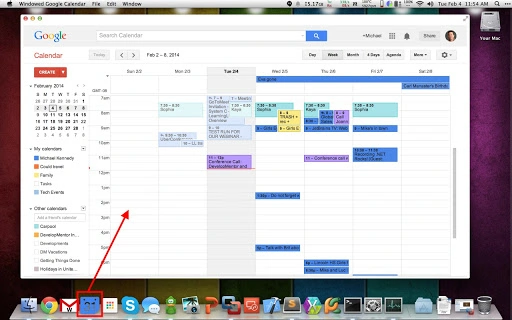
The Windowed Calendar for Google Calendar is a stand-alone desktop application designed to streamline access to Google Calendar without relying on a web browser. It serves as a dedicated calendar client, allowing users to manage their schedules efficiently while minimizing distractions from browser tabs and windows. This tool is particularly useful for individuals who use Google Calendar as their primary scheduling system but desire a more focused, application-based experience.
By providing a dedicated windowed interface with a persistent dock or taskbar icon, the application enhances accessibility and workflow continuity. Users can pin the app to their dock or taskbar for rapid launch, ensuring quick access to their calendar during daily routines. The app supports seamless switching between applications using standard keyboard shortcuts like Alt+Tab (Windows) or Cmd+Tab (Mac), making it easy to integrate into existing workflows.
Target users include professionals, students, and remote workers who rely heavily on calendar management for meetings, deadlines, and personal appointments. The application is ideal for those seeking a lightweight, distraction-free alternative to browser-based calendar access. While the developer has not provided additional background details, the product’s design suggests a focus on simplicity, usability, and integration with Google’s ecosystem.
Key Features & Capabilities
- Standalone Windowed Interface – Unlike browser-based access, the app runs as a dedicated window, reducing clutter and improving focus during calendar use.
- Taskbar and Dock Integration – The application appears as a separate icon in the system’s taskbar (Windows) or dock (Mac), enabling quick access and visual distinction from other apps.
- Quick Launch via Pinning – Users can pin the app to their dock or taskbar for immediate access, eliminating the need to open a browser and navigate to Google Calendar.
- Effortless Application Switching – The app integrates smoothly with native OS shortcuts like Alt+Tab and Cmd+Tab, allowing users to switch between tasks without losing context.
- Browser-Free Calendar Access – Designed to function independently of the web browser, reducing resource usage and minimizing distractions from unrelated tabs.
These features support real-world usage scenarios such as managing back-to-back meetings, tracking project deadlines, or scheduling personal appointments without the overhead of a full browser session. The application’s lightweight nature ensures it remains responsive even during high workloads, making it suitable for users who prioritize efficiency and minimalism in their digital workspace.
User Interface, Workflow & Performance
The user interface of Windowed Calendar for Google Calendar is designed around simplicity and functionality. It presents a clean, windowed view of Google Calendar, mirroring the core layout and navigation of the web version. Users can expect familiar elements such as day, week, and month views, event creation tools, and calendar synchronization indicators.
Navigating through the app is intuitive, with standard mouse and keyboard interactions supported. The workflow emphasizes speed and accessibility—users can open the calendar, view events, and add new entries with minimal steps. The app maintains a consistent visual style that aligns with the operating system’s native design language, ensuring a seamless experience across Windows and Mac environments.
Performance details were not specified by the developer. However, given its small file size of 14.7 MB and standalone nature, the application is expected to consume minimal system resources. The developer did not specify resource usage details. General software behavior patterns suggest it will operate efficiently under typical usage conditions, with stable performance across sessions. No reports of crashes or instability were mentioned in the provided information.
Compatibility & System Requirements
Windowed Calendar for Google Calendar is compatible with both Windows and Mac operating systems. The application supports the latest versions of these platforms, ensuring broad accessibility across modern desktop environments. It is available as a desktop application, designed to run natively on each supported OS.
The installation size is 14.7 MB, indicating a lightweight footprint. This small size suggests the app is optimized for fast installation and minimal disk usage. The developer did not specify exact system requirements, including CPU, RAM, or disk space thresholds. Exact system requirements were not listed. Compatibility information was partially provided, with only OS support and file size confirmed.
Pros and Cons
Pros
- Standalone windowed access to Google Calendar without browser dependency
- Quick launch via taskbar/dock pinning for improved workflow efficiency
- Seamless integration with OS-level application switching shortcuts
- Minimal system resource usage due to lightweight design
- Simple, distraction-free interface tailored for calendar management
Cons
- No detailed system requirements provided
- Limited information about offline functionality or data sync behavior
- Developer background not disclosed
- No built-in event reminders beyond Google Calendar’s native capabilities
- Dependent on Google Calendar’s API, which may affect functionality if changes occur
FAQ Section
Is Windowed Calendar for Google Calendar available for both Windows and Mac?
Yes, the application is designed to run on both Windows and Mac operating systems, offering native support for each platform.
Is the software free to use?
Yes, Windowed Calendar for Google Calendar is available at no cost. There are no subscription fees or in-app purchases required.
Does the app work offline?
As a web-based calendar client, the app requires an active internet connection to sync with Google Calendar. Offline functionality is not supported.
How often does the app receive updates?
Updates are released periodically to maintain compatibility and improve performance. The latest version is 1.2.0, and users are encouraged to keep the app updated.
Is my Google Calendar data secure when using this app?
The app uses standard Google authentication protocols and does not store your calendar data locally. Your information remains secure within Google’s ecosystem.
Final Thoughts + CTA
Windowed Calendar for Google Calendar delivers a focused, efficient alternative to browser-based calendar access. Its lightweight design, native OS integration, and streamlined workflow make it an ideal tool for professionals and individuals who value productivity and minimalism. By eliminating browser clutter and offering quick access via taskbar and dock icons, the app enhances daily scheduling efficiency.
While some technical details such as system requirements and offline capabilities are not fully disclosed, the app’s core functionality is solid and well-executed. It’s particularly suited for users who rely on Google Calendar as their primary calendar client and want a cleaner, more dedicated experience.
Download Windowed Calendar for Google Calendar now to simplify your daily planning and enjoy a distraction-free way to manage your schedule.
Guides & Tutorials for Windowed Calendar for Google Calendar App for Chrome
How to install Windowed Calendar for Google Calendar App for Chrome
- Click the Preview / Download button above.
- Once redirected, accept the terms and click Install.
- Wait for the Windowed Calendar for Google Calendar App for Chrome download to finish on your device.
How to use Windowed Calendar for Google Calendar App for Chrome
This software is primarily used for its core features described above. Open the app after installation to explore its capabilities.
User Reviews for Windowed Calendar for Google Calendar App for Chrome 0
No reviews found





